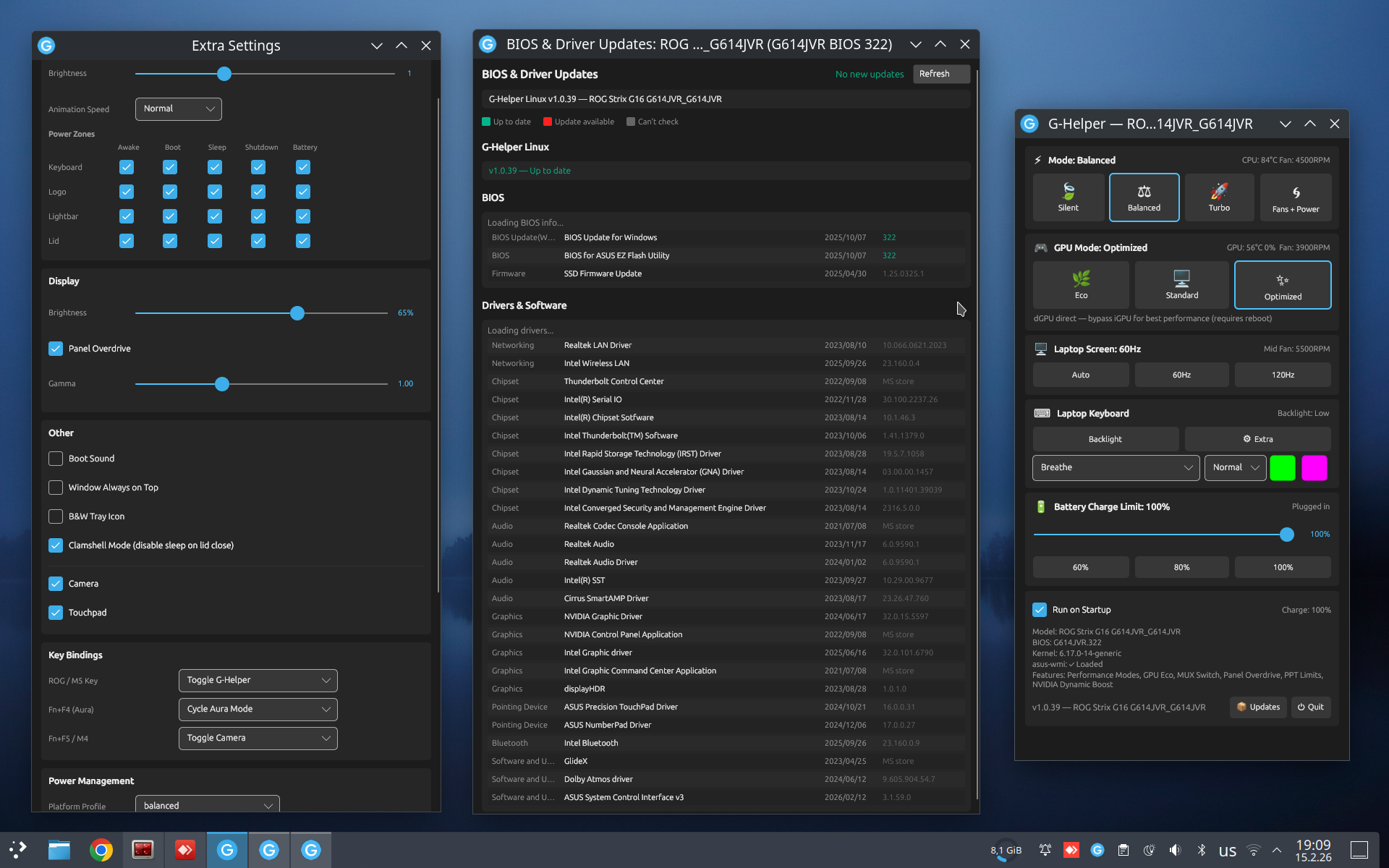
v1.0.93 (2026-09-18)
Added
- Experimental manual fan control for models whose firmware has no fan curve support (TUF FA506/FA507/FX506/FX507). Extra window checkbox to enable it(#59, #177).
- Fn Lock state is remembered across restarts. New installs still default to off (#186, thanks @achagani).
- SECURITY.md: supported versions, private reporting, helper trust boundaries.
- Diagnostics report includes the manual fan enable and running state.
Fixed
- PL1/PL2/fPPT bounds are read from the firmware min_value/max_value instead of the model table, so the sliders cannot offer a wattage the kernel rejects with EINVAL (#181, thanks @RicardoEGG).
- audio-helper test_frames.py used a stale frame size and unpacked trailing fields at the wrong offset.
Changed
- Avalonia 12.1.2, Svg.Controls.Skia.Avalonia 12.0.0.17, Svg.Skia 5.2.3.
- GitHub Actions: checkout v7, setup-dotnet v6, upload-artifact v7, download-artifact v8, github-script v9, action-gh-release v3.
v1.0.92 (2026-08-23)
Added
- OLED panel detection for HT7407 and S3607 models.
Fixed
- PPT limit writes cache only successful values, so a rejected write is retried instead of blocked until restart.
- PPT dedupe cache locked against the firmware-attribute watcher thread.
- GPU temperature readings at or above 125 C are dropped as sensor glitches.
- NixOS: gpu-helper gets the driver runpath (#176, thanks @localcc).
Changed
- Refresh rate switch is skipped when the panel is already at the target rate.
v1.0.91 (2026-08-19)
Added
- XG Mobile: dock panel hints to add
pcie_port_pm=off when live switching hangs (#171).
Fixed
- udev rules return success when a node is absent, so systemd-udevd stops logging false RUN failures (#165, thanks @tlamoureux24).
Changed
- Svg.Controls.Skia.Avalonia 12.0.0.15, ILCompiler 10.0.10.
v1.0.90 (2026-08-02)
Added
- FnF5 debounce: coalesces rapid performance-mode keypresses over 300ms to prevent kernel BUG from ACPI mutex contention.
- dGPU temperature monitoring toggle in Extra Window.
- Battery time-to-empty/full estimate and charge-based (uAh) battery support in Battery Info.
- Wayland touchpad/touchscreen toggle via KWin D-Bus, GNOME gsettings, and COSMIC config.
- SystemTelemetry helper and GpuQueryGate for gated GPU polling.
- gpu-helper: drm_notify_remove, nvidia_refcnt_holders, and NVML MPS client process scanning.
- System GPU holders now logged separately during Eco switches (nvidia-powerd, compositors, portals etc.).
- SysfsHelper: FindConnectedDisplays and HasInternalDisplay for DRM topology.
- Changelog button in Updates window.
Fixed
- ExtraWindow _suppressEvents clobber causing spurious "display set to Auto" notification on window open.
- GPU tuning reset now refreshes nvidia-powerd after writing firmware attributes.
- gpu-helper snprintf buffer overflow and comment syntax warnings.
Changed
- AttrBehavior enum classifies firmware attribute write semantics.
- MiniLED mode count read from firmware instead of hardcoded 2.
- GpuMuxMode prefers firmware-attribute backend.
- XGM brightness panel hidden when only kernel LED class is available.
- Removed redundant default initializers.
v1.0.89 (2026-07-31)

Added
- Bundled RyzenAdj CLI.
- LampArray lighting for 2024+ Strix/Scar (G614/G615/G634/G635/G814/G815/G834/G835) and Slash: software-painted modes (Heatmap, Battery, Gradient, Zone Test) drive keyboard and lightbar through the LampArray reports these firmwares require.
- Firmware rebinding of the Strix M1/M2/M3/M5 macro keys in Extra Window.
- TUF Gaming Mini Miku Edition mouse, wireless 0x1C57 / wired 0x1C56, with RGB.
- Zenbook Duo (UX8407) detachable keyboard AURA PIDs 0x1CD7/0x1CD8 + 0x1BF2.
Fixed
- One lock now serializes all ASUS HID traffic (AURA, backlight, Slash, LampArray).
- GPU temperature polling no longer blocks NVIDIA dGPU runtime suspend (#157).
- AMD SMU current limits (TDC/EDC VDD and SoC) apply again (#156), via the bundled ryzenadj CLI.
- Sudoers rule renamed
ghelper-gpu -> zz-ghelper-gpu: sudoers.d is read lexically and the last match wins (SteamOS fix).
- Fans window CPU tab Reset now also resets the AMD SMU panel: saved sliders are forgotten (no re-apply at start).
- Gradient and Zone Test send each frame twice on Strix - the direct-mode init handshake can swallow the first, leaving keyboard or lightbar dark until the next repaint.
- Lid logo controls now appear on Advantage Edition (G513QY/G713QY), which have the LED but never report the logo capability bit.
- Keyboard RGB capability probe no longer skipped when
skip_aura is set - that flag suppresses applying lighting, not detecting hardware.
- XG Mobile: dock id 0x1C28 recognised, and a 0xE6 command follows the handshake so pushed LED state is not ignored.
- dGPU mode switches wait up to 5s for the async performance-mode pipeline before touching
dgpu_disable, so fan-curve/PPT EC writes cannot interleave with the 30-60s EC-blocking toggle.
- Battery header no longer shows phantom sub-1.5W discharge when full and plugged in.
- Rainbow aura mode hidden on non-Strix keyboards, where basic and LampArray-era firmware ignores or garbles it.
- Model lists synced: TP3407 OLED, G835L/G635L miniled init, FX507Z fan-curve-with-power-limits (was FX507ZV only), GU605CR sleep reset, GU405/GU606/GA403GM dynamic boost ranges.
Changed
- AMD SMU power/temp tuning shells out to the bundled
ryzenadj instead of RyzenAdj code compiled into gpu-helper (ryzen-info/ryzen-probe/ryzen-set and vendor/gpu-helper/ryzen/ removed). Supported params and current limits come from one ryzenadj -i read; the Fans window applies all sliders in one batch, clamping to Ryzen Controller bounds, seeding unset sliders from its defaults, persisting and re-applying at start, hiding params the SMU reports unsupported.
- Avalonia 12.1.0 -> 12.1.1.
v1.0.88 (2026-07-25)
Changed
- NixOS:
ghelper builds from source via buildDotnetModule (Native AOT) instead of wrapping a prebuilt dist/ binary, so nix build .#ghelper no longer needs ./build.sh first. Adds a deps.json NuGet lockfile, exposes ghelper-audio and wlr-randr as their own packages, and substitutes /bin/sh and the version placeholder in the udev rules (#159, thanks @localcc).
v1.0.87 (2026-07-13)
Added
- Gamepad UI navigation: evdev, D-pad focus, A/B confirm/back, X/Y OSK, right stick scrolls.
- Steam shortcut: Updates toggle + handheld first-launch offer; writes
shortcuts.vdf + 4-file grid art.
- Tray dGPU status row: active / suspended / off from PCI runtime PM (#150).
- TDP presets: Ally 10/15/25/30 W, Legion Go 8/15/22/30 W.
- Gamescope FullScreen in game mode.
- Immutable / OSTree / SteamOS detection: user-path desktop + icon; sealed SteamOS puts
gpu-helper in /etc/ghelper.
- Basic COSMIC DE support.
HasSecondGpu() topology probe: PCI class count, Eco artifacts, loaded nvidia/nouveau, BDF-validated slot cache, firmware attrs.DeviceVendor { Asus, Lenovo, Generic }; Generic skips vendor probes.udev_per_machine opt-in (default off): filters 90-ghelper.rules by #@section, tightens uinput/i2c to input-group 0660.- Extra window: Rendering backend dropdown (Auto / EGL / GLX / Software,
render_mode config). Auto uses EGL on Wayland (avoids the XWayland GLX freeze) and GLX on Xorg.
- 8 topology test scenarios (106/106).
osk_dock_tip in 38 languages.- Hidden mini-game, now gamepad-playable.
Fixed
render_mode config (software / egl / glx) overrides.
- SteamOS gamescope Back closes the topmost child window (was hitting main).
- Endless polkit password loop when sudoers is broken: pollers (
nvml-temp, nvml-info, mode auto-apply) skip pkexec fallback (#146).
- Poisoned 5 W PL1/PL2 config rejected and purged; capped CPUs at min clocks (#151).
- Startup no longer resets externally-set GPU tuning; reset-to-stock only after in-session apply (#151).
- Fans window load path can no longer write hardware via slider coupling (#151).
- pkexec exit 127 with no polkit agent: message carries the manual
sudo ... command (#143).
- NixOS declarative install: gpu-helper built from full 21-source tree + libpci (was 1 file) (#138).
- iGPU-only Lenovo (Legion Go S): GPU panel + tray Eco/Standard + backend selector hidden (nouveau.ko-on-disk leak).
- NumberPad button hidden on non-ASUS ELAN touchpads.
- Clamshell checkbox hidden on all handhelds (was Ally-only).
- Startup prompt no longer crashes on
--osk / silent-start.
- Stale
dgpu_pci_slot imports no longer fake a dGPU: BDF must match, ages out after 3 boots.
- Steam Big Picture tile shows the icon (capsule / header / hero / logo).
- Lenovo conservation fallback: battery slider snaps to 60/100.
- Ally match narrowed to
RC71 / RC72 / RC73 (was bare RC7 substring).
Changed
- Avalonia 12.0.4 to 12.1.0; Svg.Controls.Skia.Avalonia to 12.0.0.13.
- Startup integrity check async (was 3 s UI-thread block on
sudo -n -l).
- Updates window computes status once on a worker (was twice on UI).
- Fans window: nvidia-smi prefetch + dGPU holder count off UI thread.
- AURA HID handshake no longer inline on first paint.
- GamepadNav default off on desktops (
gamepad_nav=1 to enable); OSK toggle suppressed in game mode.
- Steam offer gated to handheld / SteamOS.
- Peripheral poll backs off 20 s to 5 min after 3 empty scans.
sudoers gpu-block-helper line only when boot service applies.IsSteamDeckDesktopMode via os-release, not /home/deck.i2c-dev universal by default; ASUS + NumberPad only when udev_per_machine=1.- Under
udev_per_machine=1: uinput / i2c set TAG+="uaccess" GROUP="input" MODE="0660", user added to input; udev_0666_fallback=1 restores world-writable.
v1.0.86 (2026-06-29)
Upgrading from v1.0.84?
The in-app self-updater is broken in this version because the installation
directory was created with incorrect ownership, preventing the updater from
replacing itself.
Run these commands once to fix it:
sudo chown -R $USER:$USER /opt/ghelper
sudo chown root:root /opt/ghelper/gpu-helper
Alternatively, re-run the install script.
Fixed
- Fixed install-folder permission regression from v1.0.84. Restored to v1.0.83's user-owned folder while
keeping the gpu-helper helper inside owned by root. (#145)
- CI fix.
gpu-helper was missing from the v1.0.84
binary because the build server didn't have a required library. (#144)
v1.0.84 (2026-06-28)
Added (Logitech peripherals)
- Logitech mouse / keyboard / headset support via HID++ 2.0 (USB,
Bluetooth, Unifying / Bolt receivers). New
Peripherals/Logitech/ stack
behind a shared IMousePeripheral abstraction used by ASUS and Logitech.
- ~25 models: G PRO / G PRO Wireless / G PRO X Superlight, G305, G402,
G403, G502 (Hero / Legacy / X), G604, G703, G900, G903, MX Master /
MX Master 3, MX Anywhere 3, MX Ergo, MX Vertical, MX Revolution, M500S,
MX518, plus gaming keyboards and headsets.
- Mouse window: per-device capability sections - DPI, polling rate,
performance, energy / sleep, scroll & wheel (Hi-Res, SmartShift, ratchet,
thumb wheel, crown), host switching, buttons, gestures, onboard profiles,
lighting (effects / zones), keyboard (G-keys / M-key LEDs), headset
(sidetone, mic gain / mute, EQ).
- Settings persisted per device, re-applied on connect, resume, monitor wake.
- Background Bluetooth reconnect polling with stale-handle pruning (HidSharp
misses BT hidraw events).
- New ASUS model: Strix Impact II Moonlight White.
Added (AMD Ryzen)
- AMD Ryzen SMU tuning via bundled ryzenadj (new gpu-helper
ryzen-*
subcommands, direct SMU mailbox). Fans window Ryzen panel: STAPM / fast /
slow / APU-slow limits, STAPM & slow time, Tctl / APU-skin / dGPU-skin
temp limits, VRM current limits, and min / max GFX clock.
- ASUS PPT writes route through the SMU when asus-wmi sysfs is a no-op,
falling back to sysfs.
Added (NixOS)
- Declarative flake, module, and package under
nixos/. Installer stages
the module + binary, injects the import into configuration.nix, and runs
nixos-rebuild. In-app "Update & Rebuild" goes through nixos-rebuild switch (binary lives in the read-only store). Integrity panel verifies
Nix store locations, not FHS paths; in-app uninstall hidden.
- Module options:
services.ghelper.enable, user, gpuEcoAtBoot (Eco at
boot), gpuBootService (early-boot GPU-mode service).
Added (GPU)
- PCI backend live Eco switch:
rmmod + PCI-remove dGPU functions on
systems without firmware dgpu_disable (no reboot). Shows the Switch Now
/ After Reboot dialog when the driver is active.
- NVML telemetry via gpu-helper: fast GPU temp (~5 ms, no nvidia-smi fork),
used as a fallback by the ASUS and Lenovo backends.
- Diagnostics: GPU switch hazard detection (
nvidia_wmi_ec_backlight force=1, i915 enable_dpcd_backlight, acpi_backlight=nvidia_wmi_ec| vendor, nouveau alongside nvidia, dGPU on vfio-pci). Adds NVML info/live,
VBIOS, mem bus width, temp shutdown/slowdown thresholds, NVMe power-state +
ASPM deep-save warnings.
Added (general)
- "Keep keyboard backlight always on": re-lights the keyboard when the
monitor blanks (DPMS) on desktops that kill it.
- Panel overdrive persisted and restored on resume, auto-screen, and hotkey.
- Extra window: Peripherals section to disable Logitech or ASUS support
(skips scans, hides panels; needs restart).
build.sh --no-aot / --fast: folder build with ~5-10 s incremental
rebuilds instead of full AOT.- udev rules: AMD GPU power/clock nodes (
pp_od_clk_voltage,
power_dpm_force_performance_level, pp_dpm_sclk/mclk,
pp_power_profile_mode, power1_cap), Logitech HID++ access (USB 046d +
Bluetooth), backlight class-path chmod fallback.
- Installer adds the user to the
input group for the keyboard remapper.
Fixed
- Old Strix / Scar: restore missing logo / lightbar / rearglow lighting
zones.
- ROG Ally: keyboard RGB now turns off at 0% brightness in gamepad mode.
- Aura: second color (Breathe / Gradient) now works on DynamicLighting
keyboards.
- Aura: fix static color on keyboards without direct-RGB support.
- ASPM: prevent NVMe-related freezes and kernel panics when switching power
modes.
- Lenovo: PPT power limits (God mode) now apply on kernel 6.12+.
- Panel overdrive: reflect whether the firmware actually applied the change.
- ASUS AURA no longer probed on Lenovo hardware.
- Lenovo: hide RGB controls when the firmware rejects RGB writes.
- Keyboard brightness toggle works on Lenovo on/off and tristate backlights,
and remembers the level.
- Fan curve editor: points stay non-decreasing while dragging.
- Fix a fan calibration timer leak.
- Battery limit slider snaps correctly on 60/80/100-only models.
Changed
- Main window peripheral panel auto-resizes when devices connect / disconnect.
- Main window audio: "Configure chain" moved from a label to a button +
tooltip.
- GPU "Switch Now" offered only on Wayland; on X11 Xorg holds
nvidia_drm
so rmmod always fails (hidden).
- gpu-helper split into modular units (process / nvidia / pci / wmi / msr /
lenovo / ryzen ops) plus bundled ryzenadj.
- Unified
modules-load.d/ghelper.conf (uinput + i2c-dev always; +
ideapad-laptop / lenovo-wmi on Lenovo), replacing the Lenovo-only file.
- Bumped LiveChartsCore (dev-570 -> dev-798) and Svg.Skia (12.0.0.11 ->
12.0.0.12).
v1.0.83 (2026-06-12)
Added (Lenovo)
- Lenovo IdeaPad / Legion / LOQ / Yoga support via mainline
ideapad-laptop
and lenovo-wmi-* drivers.
- Main window: performance modes, keyboard backlight, battery conservation,
GPU row (PCI backend Eco/Standard). Fn+Q via
platform_profile watcher.
- Updates window: BIOS + driver updates from Lenovo support catalog API.
BIOS version comparison
- Diagnostics window: Lenovo state dump (ideapad attrs, WMI, PPT readback).
- Installer: udev rules,
modules-load.d for Lenovo kernel modules.
- Vendor auto-detection from DMI;
IHardwareControl interface replaces
IAsusWmi.
Added (ASUS)
- Matrix window: AniMatrix LED panel (images, animations, clock/audio).
- NumberPad window: touchpad calculator overlay.
- Mouse window: (buttons, DPI, polling, lighting).
- Main window: status LED toggle.
- Extra window: per-mode CPU EPP slider, deep sleep (
mem_sleep).
Added (GPU switching)
- DRM compositor signaling: synthetic
"remove" uevent on the nvidia DRM
card before PCI unbind. KWin/mutter release /dev/dri/cardN gracefully.
Skipped when nvidia is the only GPU.
- I2C holder detection: finds processes holding nvidia DDC/CI adapters
(
/dev/i2c-*) that silently pin the module refcount (powerdevil, OpenRGB).
- DRI holder detection: finds processes holding
/dev/dri/cardN or
renderDN on the nvidia DRM device. Single-pass scan covers nvidia, DRI,
and I2C fds together.
- EGL vendor management: hides/shows
10_nvidia.json alongside the Vulkan
ICD during Eco/Standard. Stops Chromium from probing /dev/nvidia0 via
EGL. Restored on uninstall.
- Diagnostics window: GPU switching health section (modeset, DynPM, DRM
mapping, I2C adapters, KWIN_DRM_DEVICES, ICD state).
- NVML process cross-check: queries the driver's own process list via NVML
(v3/v2/v1 fallback) to catch holders invisible to fd/maps scans.
- Kill-before-rmmod convergence loop: purge holders, rmmod, re-scan + retry
up to 3 waves. Zombie-aware survivor checks.
- GpuQueryGate: pauses nvidia-smi polling during driver release/re-enable.
- dGPU re-enable escalation: bridge wake, dgpu_disable bounce, bridge
remove + full PCI rescan. Parent bridge BDF cached.
- Driverless dGPU recovery: detects dgpu_disable=0 with no driver bound,
triggers full re-enable with explicit PCI bind by device class.
- Process scan cache invalidated on "Switch Now" click.
gpu-helper scan_maps: detects /dev/nvidia* memory mappings that pin
the driver after fd close.
Added (general)
- InputDispatcher extracted from App.axaml.cs.
- Display backends moved to
src/Display/.
- Dev tooling:
GHELPER_DEV=1 opens any window without matching hardware.
Fixed
- Unbind timeout raised to 30s + 30s late-completion polling (was 10s).
- Refcnt settle wait (1s stable) before unbind.
- Processes window: sorts by total blocking fds (nvidia + DRI + I2C),
shows
+N DRI / +N I2C suffixes.
Changed
gpu-helper list gains driFds and i2cFds TSV columns.GPUModeControl renamed from GpuModeController; GPU files reorganized
into NVidia/ and AMD/ subdirectories.

v1.0.82 (2026-06-08)
Fixed
- Audio helper: fix vocoder disable and streamline capture stream creation.
v1.0.81 (2026-06-08)
Fixed
- Audio helper: fix
ghelper-audio build error handling in CI.
- Updated installation instructions.
v1.0.80 (2026-06-07)
Added
- PipeWire audio helper: native C helper (
ghelper-audio) that registers a
virtual "G-Helper Microphone" source directly in PipeWire. Three-stream design (capture, virtual
source output, monitor playback) with lock-free atomic parameter exchange
between the UI thread and the real-time audio callback.
- Noise suppression via bundled RNNoise (Mozilla/Xiph, BSD-3-Clause): recurrent
neural network denoising with configurable aggressiveness
- 9-band parametric EQ with RBJ-cookbook biquads (peak, low-shelf, high-shelf,
high-pass, low-pass, notch, band-pass).
- Delay effect: sample-accurate delay line up to 1000 ms with feedback and
dry/wet mix.
- Reverb effect: Schroeder-style reverberator with room, damping, width, and
mix controls.
- Channel vocoder: multi-band analysis/synthesis with configurable carrier
(fixed Hz or pitch-following)
- Voice effects chain: pitch shifter (granular, -24 to +24 semitones), autotune
(chromatic snap or fixed-pitch monotone), bitcrusher, ring modulation with
matrix intensity, band-pass voice filter, and stutter gate.
- Monitor playback: route processed audio to the default sink so users hear
their virtual mic in real time.
- Source selection: retarget the capture stream to a specific PipeWire source
node at runtime.
- Master volume control with soft-clipping above unity (0..200%).
- Persistent Eco mode: "Re-apply Eco on every boot" checkbox in the
Advanced panel. Survives mode switches and reboots. Models known to
forget Eco (G635L, G615L, G835L, G815L, FA506, FX517) have this always
enabled.
- Service-disabled detection: added a system files integrity panel that detects
when the boot service is disabled and offers a one-click repair.
- HID output-report padding: USB HID writes are padded to the device's
max report length, fixing silent message drops on controllers like the
G533QS.
- Add drag entire fan curve with holding shift
- Various fan curve changes
- Auto-apply fan curves tooltip explaining what the checkbox does and why
fan settings reset without it.
- Export Diagnostics button: opens a save file dialog
- Startup update prompt: non-modal dialog offers to download and install
the update directly
- ASUS ROG "Slash" LED bar support on compatible laptop lids
- 9 new languages: Slovak, Slovenian, Filipino, Latvian, Lithuanian,
Malay, Nepali, Hindi, Bengali.
Fixed
- Removed Switch Now button from Ultimate to Eco since it will always freeze the system
- Boot service MUX=0 safety: udev block rules now include a boot_vga guard
so the dGPU is not removed when it is the sole display (Ultimate mode /
MUX=0).
- Screen refresh rate detection fixes.
- App startup no longer wipes modprobe/udev block artifacts installed by the
boot service for persistent Eco. On-disk marker is the ground truth.
persistent-preserve branch was taken.
- Added FX517 (TUF Dash F15) to the Eco boot fix model list for issue #121.
- Battery charge control udev rule permissions fix.
Changed
- Boot service ordering, bring back nvidia-powerd.service.
- Removed dead code: IsManualModeRequired(), rmmod_modules(),
pci_autoprobe_off/on(), remove_dgpu_pci().


v1.0.79 (2026-05-30)
Action required: re-run the install script
All root GPU operations now go through a single helper binary (/opt/ghelper/gpu-helper) behind one sudoers entry.
The boot service unit was hardened. Updating the binary alone is not enough -
re-run the install script so the new helper and sudoers file are deployed:
curl -sL https://raw.githubusercontent.com/utajum/g-helper-linux/master/install/install.sh | sudo bash
Added
- Live Eco / Standard switching without a reboot, with automatic rollback if the
driver cannot be released
- "Processes using dGPU" window listing every process holding the dGPU
- Service-aware process termination on Eco "Switch Now": holders are stopped
- systemd-service indicator in the dGPU processes window: holders backed by a
unit show a small badge with the unit name (e.g.
rustdesk.service)
- GPU tuning: nvidia-smi power limit / clock lock and NVML core+mem clock offsets
- Experimental Intel CPU undervolting, alongside the existing AMD Ryzen Curve Optimizer
- Recovery dialog when the dGPU is enabled in firmware but does not re-appear on
the PCI bus after repeated rescans (slow ASUS firmware) that advises a reboot
instead of leaving a silent broken state
- Diagnostics dump now includes the
gpu-helper journal so a copied report shows
exactly what ran
- Add keep keyboard backlight always on option to Extra window
Fixed
ghelper itself holding /dev/nvidia* FDs under PRIME render offload.
Program.cs:Main sets __NV_PRIME_RENDER_OFFLOAD=0,
__GLX_VENDOR_LIBRARY_NAME=mesa, and DRI_PRIME=0 when unset so ghelper does
not appear as a dGPU holder- Eco to Standard sometimes leaving the dGPU off: the re-enable path now polls
for the device and re-issues
/sys/bus/pci/rescan (up to 10s) and only starts
the NVIDIA daemons once the device is actually present, instead of waiting on
the kernel module (which can linger from a respawn loop with no GPU)
- Opening the Extra window triggered unwanted side effects
- Keyboard backlight turning off when monitor turns off (option to keep on in Extra window)
Changed
- All privileged GPU operations were consolidated into one helper
binary,
gpu-helper (embedded in the AOT binary, extracted to
/opt/ghelper/gpu-helper, mode 755). It exposes validated subcommands - list
/ kill dGPU holders, NVIDIA daemon stop/start/reset-failed, module rmmod, PCI
bind/unbind, nvidia-smi power/clock, whitelisted modprobe, and NVML clock
offsets - each guarded by an internal whitelist.
- Dependency updates: Avalonia to 12.0.4 (bundled SkiaSharp 3.119.3-preview to 3.119.4 stable, Svg.Controls.Skia.Avalonia to 12.0.0.11 (Svg.Skia 4 to 5), and LiveCharts to dev-570

v1.0.78 (2026-05-23)
Added
- A16 FA608UM - Optimal Display Brightness control (Off / On Always / On Battery only) in Extra Settings
Changed
- Diagnostics dump expanded with NVIDIA, AMD GPU, Power Source, CPU, App Config, Displays, ghelper systemd units, and Suspend / Resume sections
- Removed unused "Open Log File" button and related i18n keys
What's Changed
v1.0.77 (2026-05-19)
What's Changed
v1.0.76 (2026-05-18)
Hotfix for release v1.0.75. On non Asus devices and non MUX Asus devices the GPU switch section was missing.
Commits
- Fix PCI mode not knowing that there is a dgpu by checking the boot service artifact
- Add GPU switching options to issue template [skip-ci]
What's Changed
v1.0.75 (2026-05-17)
Action required: re-run the install script
The GPU boot service files (ghelper-gpu-boot.sh, gpu-block-helper.sh, ghelper-gpu-boot.service) have been updated. Simply updating the binary is not enough - you must re-run the install script to get the new boot service:
curl -sL https://raw.githubusercontent.com/utajum/g-helper-linux/master/install/install.sh | sudo bash
GPU mode switching rework
- Added PCI backend: disables dGPU via modprobe blacklist + udev hot-remove rule, no ASUS firmware required
- PCI backend works on non-ASUS laptops with a discrete NVIDIA GPU
- Switching from Eco to Standard is now live in both backends (no reboot required)
- Switching into Eco mode still requires a reboot (driver in use by display server)
- Boot script MUX=0 safety recovery now runs for both backends
- MUX=0 impossible state (Ultimate pending + Eco requested) is blocked with a notification (it can still happen if using other software like envycontrol)
- Removed "Switch Now" button from GPU driver dialog
- GPU backend selector added to Extra settings (PCI disable / ASUS WMI)
- "Optimized GPU" mode hidden behind a config flag; not shown by default
- Boot service now activates on PCI backend hardware (no ASUS WMI module required)
- Boot script retry/back-off logic for failed Eco transitions (issue #94)
Experimental XG Mobile dock support
- Detect connected XG Mobile dock via USB HID (VID 0x0B05, known dock PIDs)
- Control dock LED ring: on/off, brightness, Aura mode and colour
- Show XG Mobile fan curve in the Fans window when dock is connected
Diagnostics
- Boot service state dumped in diagnostics: pending trigger, retry counter, last failure, last recovery marker
UI
- GPU button row collapses to match the number of visible buttons
- New confirm dialog component
- Optimized button is now hidden behind a config flag
- Ultimate buttons hidden in PCI backend mode

v1.0.74 (2026-05-10)
Commits
- Update visibility condition for rear lid power row based on Z13 configuration
- update
- use old logic
- revert plus sync
- Add Z13-specific 0x1A wake probe to read led
- HidrawHelper dedup discarded AURA-capable interfaces on Z13, upstream updates
What's Changed
v1.0.73 (2026-05-04)
What's Changed
Added:
- software fn-lock remapper (EVIOCGRAB + /dev/uinput) with per-key and
per-model F1..F12 mappings #82
- FN-Lock title-row button on MainWindow keyboard panel (gray off,
blue accent on)
- FN-Lock toggle hotkey (Super+F2 default) detected inside the
remapper event loop, plus tray menu entry with active-state mark
- FnLockWindow with Behavior, Devices, Per-key map, Advanced sections
- List of default keyboard mappings per device for multimedia keys.
- per-mode platform_profile dropdowns (Silent / Balanced / Turbo) in
ExtraWindow > Power Management, populated from
/sys/firmware/acpi/platform_profile_choices
- IPowerManager.GetPlatformProfileChoices()
- Lang updates
- Experimental ROG Ally support
Fixed:
- duplicate platform-profile synonym table between LinuxPowerManager
and ExtraWindow collapsed into single source of truth
- three near-identical Raise*FromFnLock wrappers in App.axaml.cs
collapsed via PostToApp dispatch helper
- GX651 (ROG Zephyrus G16) now correctly classified as IsSlash() and
IsCPULight() matching upstream model tables
- Upstream AURA fixes
Changed:
-
removed gpu_eco action from App
-
removed pcie_aspm UI dropdown
-
removed MigrateOldConfigDir helper from AppConfig
-
ModeControl.SetPerformanceMode honors per-mode platform_profile
override
-
Diagnostics report updated to expose Aura hardware-detection fields
alongside the remaining AppConfig flags
*Note that by default you have to click the FN-Lock button to enable it

v1.0.72 (2026-04-27)
What's Changed
Added
- Custom Aura RGB modes: Heatmap (CPU temp), GPU Mode color, Battery %, and 4-zone Gradient on Strix lightbar + keyboard
- Live CPU and GPU temperature icons in the system tray with hover tooltip
- Per-mode shell command hook in the Fans window (runs after every mode switch including auto AC/DC)
- Power-limit reapply timer to fight BIOS clobber of PPT values on certain models
- Per-AC vs per-battery keyboard backlight levels with automatic apply on AC/DC transition
- Disable notifications toggle in Extra window
- B&W tray icon quick toggle in the tray context menu
- Idempotent guard on the Raw WMI checkbox so spurious events do not restart the app
Fixed
- Autostart now writes the correct binary path on AOT builds (#80) and detects AppImage via the APPIMAGE env var so the entry survives reboots
- Fan curves and power sliders now refresh in the Fans window when the performance mode is changed (#64)
- Window positioning now opens on the same screen as the main window with a fallback to the primary monitor on multi-monitor setups (#57)
- SVG icons embedded inside buttons no longer swallow click events
- Duplicate USB devices removed from HID enumeration
- Raw WMI mode no longer triggers a pkexec prompt every time the Extra window opens
Changed
- Fans window grew an Advanced panel for the new mode hook and reapply timer, with the chart area resized so existing cards are not squashed
- Extra window gets the disable-notifications checkbox next to Start minimized to tray
- Language files updated across all 29 locales for the new strings
- Faster opening of secondary windows
- Misc upstream sync from Windows g-helper

v1.0.71 (2026-04-25)
Commits
- Fix battery detection logic in SysfsHelper to prioritize laptop batteries over HID devices #77
What's Changed
v1.0.70 (2026-04-23)
Release notes not provided.
v1.0.69 (2026-04-17)
Summary
Major update: Wayland and Xorg refresh rate control, full internationalization, framework upgrade, and hardware input fixes.
107 files changed across display backend, localization, UI, platform layer, and build infrastructure.
Added
- Wayland refresh rate switching - New display backend with auto-detection: wlr-randr (Hyprland/Sway/wlroots), kscreen-doctor (KDE Plasma), gdctl (GNOME 48+), xrandr (X11). Vendored wlr-randr v0.5.0 embedded in binary, no external dependency (fixes #30)
- Auto screen mode - Max refresh rate + overdrive on AC, 60Hz + overdrive off on battery
- Backlight controller selector - Dropdown to choose between available backlight devices (e.g. nvidia_0 vs intel_backlight)
- Internationalization - 336 strings localized to 29 languages, system locale auto-detection, persistent language override via dropdown
- GPU Tuning panel - Power limit and clock lock sliders in Extra settings (NVIDIA only, auto-hidden), single pkexec prompt
- Battery Info window - Health, cycles, capacity, voltage, manufacturer, power draw with 2-second live refresh
- Battery drain rate fallback - Computes power from current_now x voltage_now when power_now unavailable (by @GamingLizard9)
- Noto Color Emoji icons - All UI emoji replaced with embedded PNG icons for consistent rendering across systems
- AppImage packaging - AppStream metadata, fixed desktop categories
- Easter egg - Hidden somewhere in the UI
Fixed
- TUF hotkey mapping - Universal ASUS hotkey detection via MSC_SCAN codes (Windows WMI event codes), fixes ROG key and Fn keys on TUF FX517ZM and other models where KEY_* codes differ (fixes #49)
- Keyboard brightness double-increment - Detects brightness_hw_changed sysfs to avoid writing when kernel already handled the change (fixes #50)
- Keyboard brightness sync - Physical Fn keys now update ExtraWindow slider in real-time (fixes #50)
- Display brightness polling - 2-second timer catches external brightness changes from Fn keys or DE controls (fixes #50)
- Gamma hidden on Wayland - Gamma controls hidden when backend doesn't support it (fixes #50)
- Aura hotkey sync - Cycling aura mode via hotkey updates dropdowns and color buttons immediately
- Power event debounce - 3-second cooldown prevents duplicate AC/battery event handling
- UI refresh - Fixed 7 cases where backend state changes didn't update the UI
Changed
- Framework upgrade - .NET 8 to 10, Avalonia 11.2.3 to 12.0.1, SkiaSharp 2.88 to 3.119. Binary 46MB to 32MB, AppImage 18MB
- Footer redesign - Version label and action buttons reorganized
- Code cleanup - Standardized comment styles, removed non-ASCII characters from source
- CI - .NET 10 SDK, wlr-randr build step, auto-generated changelog
New Contributors
v1.0.68 (2026-04-09)
What's Changed
- Keyboard brightness on TUF/VivoZenPro: ApplyBrightness() now falls back to ACPI sysfs write when HID is unavailable (#50)
- PL slider spam on Zephyrus G16: Added 300ms shared debounce timer for PL1/PL2/fPPT sliders (#47)
- Fan count detection: Dynamically detect 2 vs 3 fans instead of hardcoding 3, fixes pwm3_enable ENODEV errors (#47)
- Display backlight on NVIDIA hybrid GPUs: When /sys/class/backlight/ is empty, detect and offer to load nvidia-wmi-ec-backlight via pkexec. Shows kernel parameter hints for Intel/AMD. Minimum brightness clamped to 4% to prevent black screen (#50)
- Security: gpu-block-helper.sh no longer accepts file paths as arguments; modprobe/udev content is hardcoded. Eliminates arbitrary file read/write via NOPASSWD sudoers rule. C# side drops all /tmp temp files, uses inline heredocs for pkexec fallback.
- Aura color picker shows white on normal startup: Race condition between background HID handshake and UI Loaded event caused InitAura() to lock itself out. Now retries until hardware is ready.
- Battery auto-refresh: Battery drain/charge info refreshes every 60s and immediately on AC plug/unplug (#35)
- PL slider coupling: Enforces PL1 <= PL2 <= fPPT, matching Windows G-Helper behavior (#35)
- Start minimized to tray: New checkbox in settings, plus autostart .desktop file management
- Reorder application of power limits, ASPM, and fan curves on mode change
v1.0.65 (2026-04-05)
What's Changed
v1.0.64 (2026-04-02)
What's Changed
New Contributors
v1.0.63 (2026-03-31)
What's Changed
v1.0.62 (2026-03-17)
What's Changed
v1.0.61 (2026-03-16)
What's Changed
v1.0.60 (2026-03-11)
What's Changed
v1.0.59 (2026-03-10)
What's Changed
v1.0.58 (2026-03-08)
What's Changed
v1.0.57 (2026-03-08)
What's Changed
v1.0.56 (2026-03-01)
What's Changed
v1.0.55 (2026-02-24)
What's Changed
v1.0.54 (2026-02-22)
What's Changed
v1.0.53 (2026-02-20)
Release notes not provided.
v1.0.52 (2026-02-20)
What's Changed
v1.0.51 (2026-02-20)
Release notes not provided.
v1.0.50 (2026-02-20)
What's Changed
v1.0.49 (2026-02-20)
What's Changed
v1.0.48 (2026-02-20)
What's Changed
New Contributors